
FoxIT Reader is a wonderful free tool to add to your PDF arsenal. Click the Play button to view a video that introduces you to FoxIT Reader and describes its wonderful features. We especially love the feature that enables us to type text in a non-editable form.
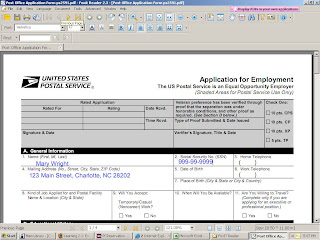
Then I opened the Post office application file I saved during THING 62. To recap: Log onto http://www.usps.com/. Click Forms. Click Employment Forms. Click PS Form 2591(PDF).
 There is one caveat, however. If you save the completed form FoxIt Reader adds a red evaluation mark to the completed form. If you buy the FoxIt Reader Pro Pack for $39.00, you can save a completed form without an evaluation mark.
I downloaded and installed it to my flash drive so that I would not leave home without it! Would you like to have your very own copy? Log onto: http://www.foxitsoftware.com/pdf/rd_intro.php
Click the DOWNLOADS link. Click Download Foxit Reader 2.3 (Installer: .exe, 2.55 MB). Click the RUN button to run the insatallation program from the FoxIt Software website. Or click the SAVE button to save the file to your computer, and run the installation program from your computer. I chose to run the installation program from the Fox It Software website. The installation process was quick and easy!
Then I opened the Post office application file I saved during THING 62. To recap: Log onto http://www.usps.com/. Click Forms. Click Employment Forms. Click PS Form 2591(PDF).
Click Tools; Typewriter Tools; Typewriter. Click in the text box you want fill in and begin to type. If the cursor doesn't land exactly where you want it to, you can click the Move cross, and drag the text box to wherever you want to place it. Then you can type to your heart's content. It is so easy!
There is one caveat, however. If you save the completed form FoxIt Reader adds a red evaluation mark to the completed form. If you buy the FoxIt Reader Pro Pack for $39.00, you can save a completed form without an evaluation mark.
You can PRINT the form without having evaluation marks added. That's what I did. It works beautifully!
I'm so glad we've had this time together. Until next time, Happy Computing!
-Mary


